MSI Kombustor
MSI Kombustor is a utility for testing GPU performance and graphic cards stress tests.



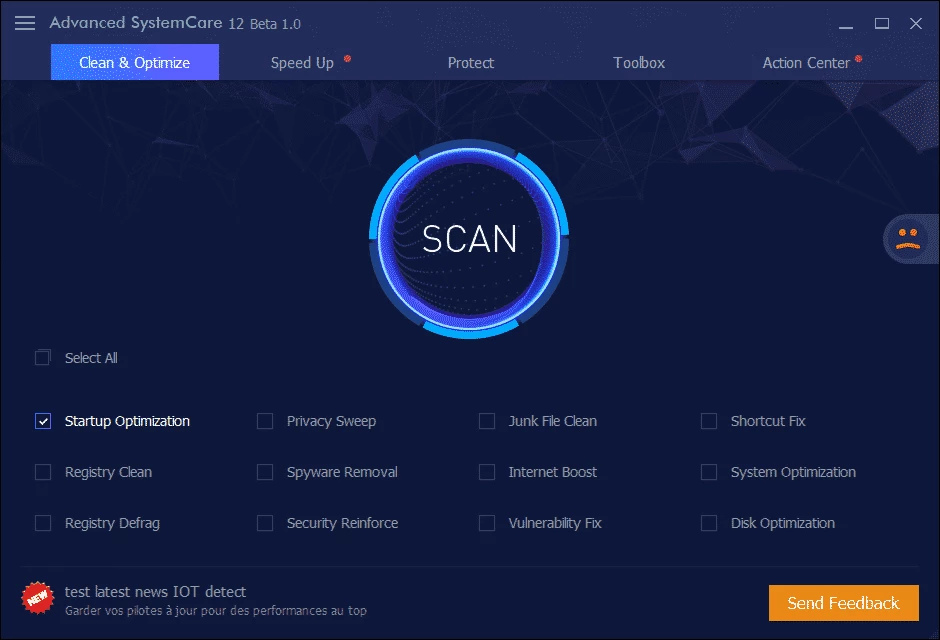

Advanced SystemCare Free is a full-fledged software used for optimizing the performance of your Windows PC while clearing all junk material. The one-click utility paired with AI Mode enables users to identify malicious content, weak settings, and privacy traces within seconds.
The software offers two types of cleaners, including Disc Cleaner and Privacy Sweep, to declutter your system and clear all types of sensitive leftovers from your apps and browsers as well. No need to micromanage any tweak, instead make your system quickly responsive and perform like a new one.
Advanced SystemCare Free, developed by IObit, is a comprehensive optimization tool for your computer. It offers fool-proof privacy and security for your system, even online browsing and downloading process. The quick scanning process thoroughly scans your system and fixes every bit after detecting spyware, malware, corrupted registry entries, and so on.
It is free, safe, and offers awesome synchronization across multiple applications to enhance the health of your computer. The tool provides a detailed report after the scanning process, and allows you to repair the detected vulnerabilities.
Download and install the app from the official website, or simply click the “Download” button given on the page. You have the option to modify the settings during installation or stay with the default settings. After installing the app, launch the app, and move to run the initial scan for detecting potential improvements. It will automatically identify the issues and recommend multiple positive suggestions.
The intuitive and visually appealing interface within blue, black, and purple has organized the dashboard into clear sections and offers straightforward navigation, even for novice users. It streamlines system optimization within multiple accessible tabs, including Care, Speed Up, and Protect, while giving access to your desired functions. Within a single click, complete the scanning process, and it will display the report of all detected content, and also offer recommendations to fix the issues, such as junk files, startup issues, unused shortcuts, and so on.
The app also offers AI mode for Windows 10 and Windows 11 to create a personalized plan for scanning and deleting junk files, logs, caches, and leftovers. A single click within a day, and detect as well as fix issues.
It also offers synchronization across multiple applications for cleaning junk material, such as Dropbox, Steam, Java, Adobe Photoshop Lightroom, Spotify, MS OneDrive, and so on. It has the following simple steps;
The software offers innovative security features, as the latest version offers awesome protection for surfing, email, and advertising. It offers FaceIDing feature that detects anyone accessing your device by their face. It is the best solution to inform you about any unauthorized access to your system. Homepage advisor is another important feature to alert about unauthorized changes to your home screen, especially to ensure the integrity of the notification displayed on the browser.
Enhance the overall performance of your system while offering additional functionalities, such as Disk Optimization offers defragmentation to improve the disk’s performance, and Disk Doctor detects hard drive errors. Protect your system from malware while detecting as well as eliminating potential threats within the Spyware Removal function. Likewise, use Turbo Boost to stop background processes and protect your system from slowing down. Real-time performance metrics, monitoring CPU, RAM, and disk usage, are also innovative functionalities.
It is also a key feature to enhance the speed of your startup, as it manages the startup items more reliably and enables your system to start running optimally. Likewise, you will find Junk File clean up, disk optimization, internet boost, and shortcut fix. However, you need to avoid Registry Defrag, because it can create complications such as accidentally deleting important information.
Pros
Cons

MSI Kombustor is a utility for testing GPU performance and graphic cards stress tests.

Unlocker allows you to delete, move, and rename locked files from your operating system

Custom Resolution Utility (CRU) fine-tuning and customizing resolution on pc

GS Auto Clicker use for repetitive clicking of the mouse

Caffeine, a lightweight and free-to-use utility to prevent your PC from falling asleep or locking up
Windows 10 Update Assistant updates your pc to the latest version of Windows 10